

Vape With Screen Explained: What the Display Tells You
Last updated: December 12, 2025
A vape with a screen isn’t just “extra”—it’s a built-in status panel. The display can tell you what the device is doing right now (charging, heating, locked), what it has done (puff count), and what might be wrong (short-circuit or low-battery warnings). If you’re buying, selling, or sourcing hardware, learning to read these indicators helps reduce returns, avoid user confusion, and improve QC at receiving.
Looking for screen-equipped SKUs? Browse our vape with screen wholesale collection.
TL;DR
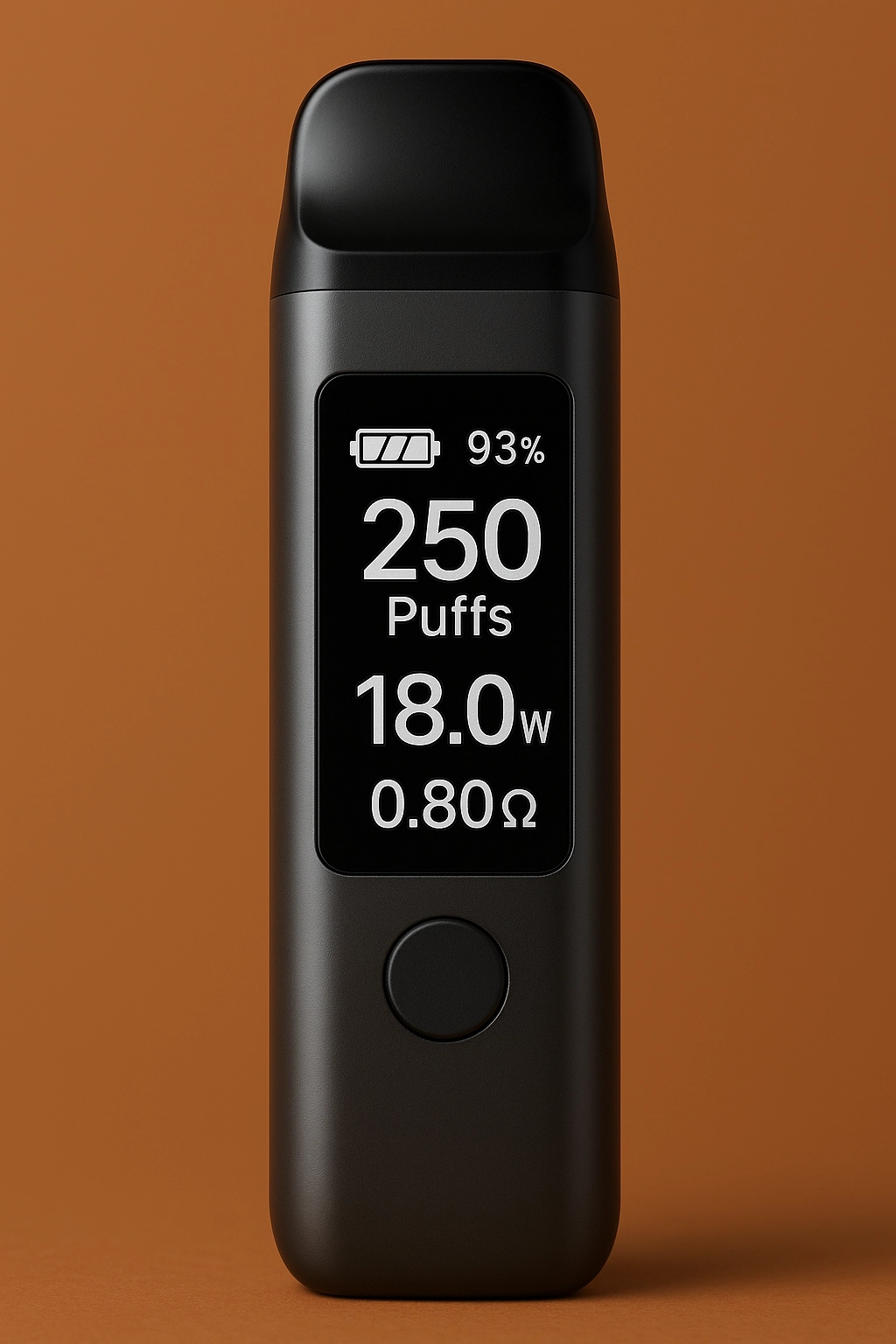
- Battery icon/% = remaining charge or charging status (not always a perfect “fuel gauge”).
- Puff counter = rough usage tracking; accuracy depends on firmware and draw detection.
- Voltage/Wattage = power output level (often fixed in disposables, adjustable in some devices).
- Ω (resistance) = coil resistance; big changes can signal coil aging or a connection issue.
- Warnings like “SHORT”, “HOT”, “LOW”, or blinking icons often point to protection circuits doing their job.
What “vape with screen” really means
“Vape with screen” typically means the device includes a small digital display (LED or OLED) that shows operating info—battery state, puffs, modes, and alerts. Public-health agencies note that some modern devices resemble “smart” electronics, including models with screens and interactive features. In legitimate B2B and retail programs, screens are best treated as a user interface and a diagnostic tool: the goal is clarity, not gimmicks.
Important context: regulators use the term ENDS (Electronic Nicotine Delivery Systems) to describe e-cigarettes and vapes broadly. How a device is categorized and distributed can vary by market and product type, so B2B buyers should keep compliance checks market-specific.
The most common display readouts
1) Battery icon, bars, or percentage
This is the most useful “everyday” indicator. A percentage is usually derived from battery voltage and a firmware estimate. Expect it to move faster at the top and bottom of the range than in the middle—especially under load (when the heater is active).
2) Charging symbol (⚡), animation, or “CHG”
Most screen devices show a charging animation or lightning icon when USB power is connected. If the device supports USB-C charging, use reputable chargers/cables—USB standards like USB Power Delivery exist to manage power negotiation safely in the broader USB-C ecosystem (devices may or may not implement PD, but quality charging components still matter).
3) Puff count
Puff counters help users and retailers estimate remaining use. They’re typically triggered by airflow sensors or button-fire events. Two important notes for B2B programs:
- Puff count is not a lab-measured consumption metric—treat it as a behavioral counter.
- Reset behavior varies: some devices reset at recharge; others keep lifetime counts.
4) Voltage (V) or wattage (W)
Some devices show output voltage/wattage, especially adjustable units. Many disposables are fixed-output but still display “V” or a mode number. If your SKU is fixed-output, the screen is primarily for status (battery, puffs, mode) rather than true “tuning.”
5) Resistance (Ω)
“Ω” represents the heating element’s resistance. In systems that measure coil resistance, sudden changes can hint at a loose connection, a damaged heater, or an internal contact problem. For B2B receiving QC, a quick resistance check (when available) can catch outliers early.
6) Mode indicators (ECO / NORMAL / BOOST, or 1/2/3)
Modes usually change power level, preheat behavior, or draw sensitivity. Mode labeling is not standardized, so the best practice is to keep a simple mode card in your product documentation (or a QR-linked quick guide).
7) Preheat icon (often a wave/coil symbol)
Preheat is designed to gently warm the heater for a short time. The screen may show a timer, a pulsing icon, or a “PRE” indicator. If your buyer base is new to screens, call out how to exit preheat and how long it runs.
8) Lock/unlock (padlock icon)
A lock icon typically indicates button lock, touch lock, or travel lock. If your device is draw-activated, the lock might disable button features only. For B2B: lock clarity reduces “dead on arrival” support tickets that are actually user-interface confusion.
9) Airflow / draw indicator
Some devices show a small animation or bars that move during a draw. This can help troubleshoot weak pulls: if the indicator never moves, the airflow sensor may not be detecting a draw, or airflow is blocked.
10) Dual-chamber or side indicator
Dual systems often display “A/B,” “Left/Right,” or two separate level bars. For retail success, the screen should make it obvious which side is active and how to switch—otherwise customers assume the device is failing.
Display cheat sheet (table)
| What you see | What it usually means | What to do (safe, practical) | B2B note |
|---|---|---|---|
| Battery bars / % | Estimated remaining charge | Recharge when low; avoid “deep drain” storage | Low-battery confusion is a top support driver—screens help |
| ⚡ / CHG | Charging detected | Use quality cable/charger; don’t leave on unstable power | Include a short “charging expectations” card in packaging |
| Puffs / PUFF | Count of detected draws (approx.) | Treat as a tracker, not lab measurement | Clarify reset rules (lifetime vs per-charge) |
| V or W | Power output or mode proxy | Keep within vendor specs; don’t “force” modes | Mode consistency matters for repeat orders |
| Ω | Coil resistance reading | If wildly off, stop use and inspect/replace device | Great for quick inbound spot-checks on screen units |
| LOCK icon | Buttons/features disabled | Unlock per quick guide | Add “unlock” steps to your listing to cut returns |
| HOT / TEMP | Over-temperature protection triggered | Stop use; allow device to cool | Protection behavior aligns with safer electrical design goals |
| SHORT / ERR | Electrical fault detected | Stop use; quarantine and RMA per policy | Track these as CAPA signals across lots |
Warnings & error codes you should take seriously
Screen devices often surface protection events that “no-screen” devices hide through blinking LEDs. Common high-priority alerts include:
- SHORT / ERR: A short-circuit or fault condition. Treat as a hard-stop and follow RMA/CAPA.
- HOT / TEMP: Over-temperature protection. Stop, cool down, and monitor recurrence.
- LOW / BAT: Low battery under load. Recharge; repeated “LOW” at high % can indicate a weak cell.
- CHG FAIL: Charging handshake failure. Try a different cable/charger; quarantine if persistent.
Industry safety testing for vape electrical systems (including battery and charging behavior) is commonly referenced under UL 8139 in North America. Even if your SKU is not formally listed, aligning design/QC thinking with recognized safety frameworks helps reduce preventable hazards.
Why screens matter for QC & safer operation
Screens create a feedback loop: they make it easier to identify “normal” behavior and to flag outliers fast. For B2B buyers, that supports two big priorities:
- Lower support costs: Customers can see battery, lock status, and modes instead of assuming a device is defective.
- Better inbound QC: Quick checks (battery reporting, puff counter increment, resistance display, charging detection) can catch a bad lot early.
Compliance signals you can request from suppliers
- Battery safety testing alignment: IEC 62133-2 is widely referenced for rechargeable lithium battery safety (portable sealed cells under intended use and reasonably foreseeable misuse).
- Shipping readiness: Lithium batteries are expected to pass UN 38.3 transport tests; in the U.S., PHMSA also references lithium battery test summary requirements tied to UN 38.3.
- Ingress protection clarity: If a device claims an IP rating, check that it maps to IEC 60529 terminology (and ask what was tested).
These are procurement and risk-management checks—not marketing claims. Your goal is consistent lots, fewer RMAs, and clearer documentation.
Troubleshooting with the display
Scenario A: “It turns on, but feels weak”
- Check battery % under use (some screens dip hard at low charge).
- Check mode (ECO vs BOOST can feel very different).
- If Ω is shown and it’s far from normal for that SKU, treat as a defect signal.
Scenario B: “It won’t fire”
- Look for a lock icon.
- Confirm charging is detected (⚡/CHG) if the battery is low.
- If “SHORT/ERR” appears, stop use and follow your returns workflow.
Scenario C: “It heats, then stops”
- Watch for HOT/TEMP warnings.
- If overheating repeats across multiple units in the same lot, escalate as a QC/CAPA issue.
B2B buying checklist for screen devices
- Legibility: Can the screen be read in daylight? Is the battery % large enough?
- Clarity: Are icons intuitive (lock, charging, mode)? Do you have a one-card quick guide?
- False-defect prevention: Does the device clearly show “locked” vs “dead”?
- Protection behavior: Are fault states obvious (SHORT/HOT) so users don’t keep pushing it?
- Inbound QC plan: Sample-check charging detection, puff increment, and (if available) Ω stability.
- Market risk: Public-health agencies and regulators pay attention to “smart” features—avoid UI elements that look like games/rewards and keep documentation clearly adult-focused where applicable.
If you also carry non-screen SKUs for simpler programs, compare categories here: wholesale disposable vapes.
FAQ
Does a puff counter mean the device is “measured” or “metered” accurately?
Not necessarily. Puff counters typically track draw detection events. Use them as a usage indicator, not a lab metric.
Why does the battery % drop quickly during a draw?
Heating loads can cause temporary voltage sag. Many devices estimate battery % from voltage, so the displayed number can “dip” under load.
What’s the most helpful screen feature for reducing RMAs?
Clear lock status + clear charging status. These two alone eliminate a large share of “it’s broken” tickets that are actually UI confusion.
If a device shows an IP rating, can I treat it as waterproof?
IP ratings are defined under IEC 60529 and vary widely. Always check the exact rating (e.g., dust vs water ingress) and what conditions were tested.
References
- FDA — E-Cigarettes, Vapes, and Other ENDS (overview)
- FDA — ENDS Authorized by the FDA
- CDC — About E-Cigarettes (notes on “smart vapes” with screens)
- UL — Testing to UL 8139 (battery/charging/electrical systems)
- UL — UL 8139 recognized as an industry safety standard
- IEC — IEC 62133-2:2017 (lithium battery safety)
- PHMSA (U.S. DOT) — Lithium battery UN 38.3 test summary guidance
- USB-IF — USB Power Delivery overview
- IEC — IP ratings (IEC 60529)
- IATA — Lithium Battery Guidance Document (transport context)
0 Comments